
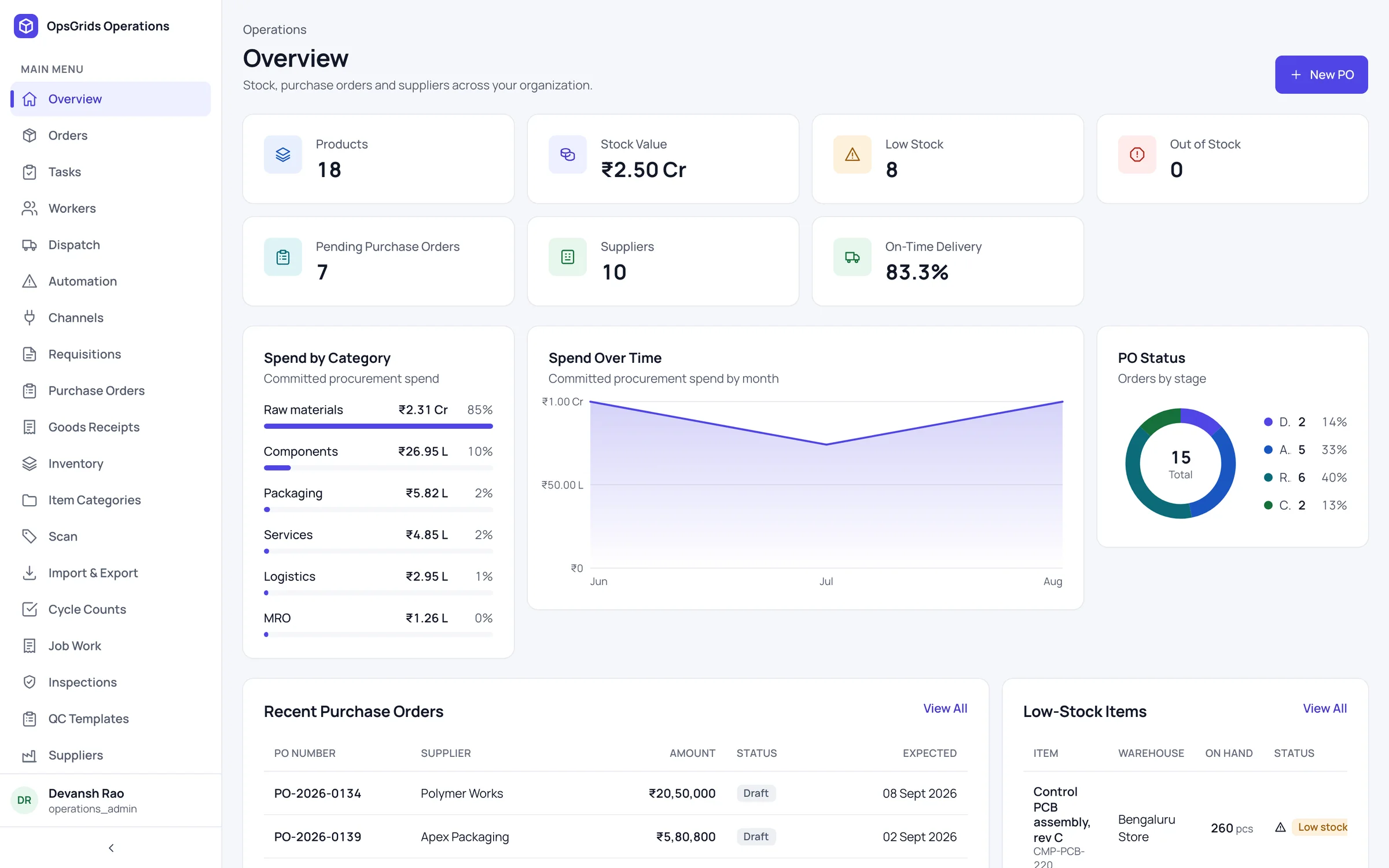
OpsGrids Operations & Inventory keeps your stock items, suppliers and purchase orders in one place, inside the same organisation and login as the rest of OpsGrids. It is for businesses that buy and hold goods and have outgrown a stock sheet, a supplier list in someone's phone and purchase orders sent as messages.
Who it is for
- A purchase or stores manager who keeps reorder levels in a spreadsheet and wants them next to the item, where everyone can see them.
- An owner who wants to know which suppliers deliver on time, and how much is spent with each, before the next order.
- A business with more than one storage location that wants each one on record, not just in someone's head.
- A finance team that wants purchase orders recorded down to the line, so a supplier's invoice can be checked against what was ordered.
What you can do with it
Inventory items with reorder points
Each item carries a reorder point: the stock level at which it should be bought again. It is recorded and shown with the item, so nobody keeps a separate list. Nothing raises an order on its own yet; a person decides and raises it.
Warehouses
Record each warehouse, so a business with a main store and a branch godown has both on file. Warehouses exist in the API today, but their screens are still marked coming soon in the app.
Supplier scores
Suppliers are scored on lead time, on-time percentage and spend. When two suppliers can provide the same item, you can compare how long each takes, how often each arrives when promised and how much you already buy from each.
Purchase orders down to the line
A purchase order records each line of what you are buying. Line-level detail lets anyone answer later what was ordered and from whom, without searching old messages.
Goods receipt against purchase orders
When goods arrive, a goods receipt is recorded against the purchase order, so you can see what came in against what was ordered. Receiving works through the API today; its screens are still marked coming soon in the app.
How it fits a working week
- Monday stock review. The stores manager looks through items near or below their reorder points and lists what needs buying.
- Choose the supplier. For each item, compare supplier scores on lead time, on-time percentage and spend.
- Raise the purchase order. Record the order line by line.
- Receive the goods. When the delivery lands, record a goods receipt against the purchase order it fulfils.
- Hand over to accounts. Accounts takes the supplier's invoice from there and checks it against the order and receipt.
From stock to purchase order
The pieces connect in a simple chain. A reorder point tells you an item is running low. Supplier scores help you decide who to buy from. The purchase order records exactly what you asked for, and the goods receipt records what actually came in.
Today, each link in that chain is a person acting on what OpsGrids shows them. Reorder points are recorded and shown, but no rule turns them into a purchase order. Routing a purchase order above a threshold up the reporting line for approval is designed, not built.
The chain continues into finance. GST input tax credit on what you buy is checked in OpsGrids Finance, which includes IMS supplier reconciliation, payments and a full ledger. Using the goods receipt as the thing a supplier invoice reconciles to is designed, not built, so the check that invoice, order and receipt agree is still done by your team.
Timing matters here. Rule 37 of the CGST Rules is reported to require reversal of input tax credit when the supplier is unpaid 180 days after the invoice date, re-availed on payment. Section 15 of the MSMED Act, 2006 is reported to set a payment limit for micro and small enterprise suppliers: up to 45 days if agreed in writing, otherwise 15 days. Confirm both with your CA. Our procure-to-pay guide walks through the full cycle.
Where it stops today
There are no automation rules yet: reorder points are recorded and shown, but nothing raises a purchase order on its own. Receiving and warehouses are in the API, but their screens are still marked coming soon in the app, so plan for API use or a manual process for those steps for now. Approval routing for purchase orders and matching supplier invoices to goods receipts are designed, not built; keep your current approval habit and your accountant's invoice check alongside it.
Questions buyers ask
Will OpsGrids raise a purchase order automatically when stock is low? Not yet. Reorder points are recorded and shown, but there are no automation rules, so a person raises the order.
Can my team record goods received from the app? Not from the app screens yet. Receiving works through the API, and its screens are still marked coming soon.
Do purchase orders go through an approval chain? Routing a purchase order above a threshold up the reporting line is designed, not built. The only approval chain live today is attendance correction in HRMS; see stop chasing approvals.
How are suppliers scored? On lead time, on-time percentage and spend, so you can compare suppliers before you order.
We run purchasing on spreadsheets. Where do we start? Start with items and reorder points, then suppliers, then raise new purchase orders in OpsGrids. Our guide on moving from spreadsheets to one platform covers sequencing the move.
Sources (checked 5 October 2026)
- CGST Act, 2017 and CGST Rules, 2017, Rule 37 (cbic.gov.in)
- Micro, Small and Medium Enterprises Development Act, 2006, section 15 (msme.gov.in)