
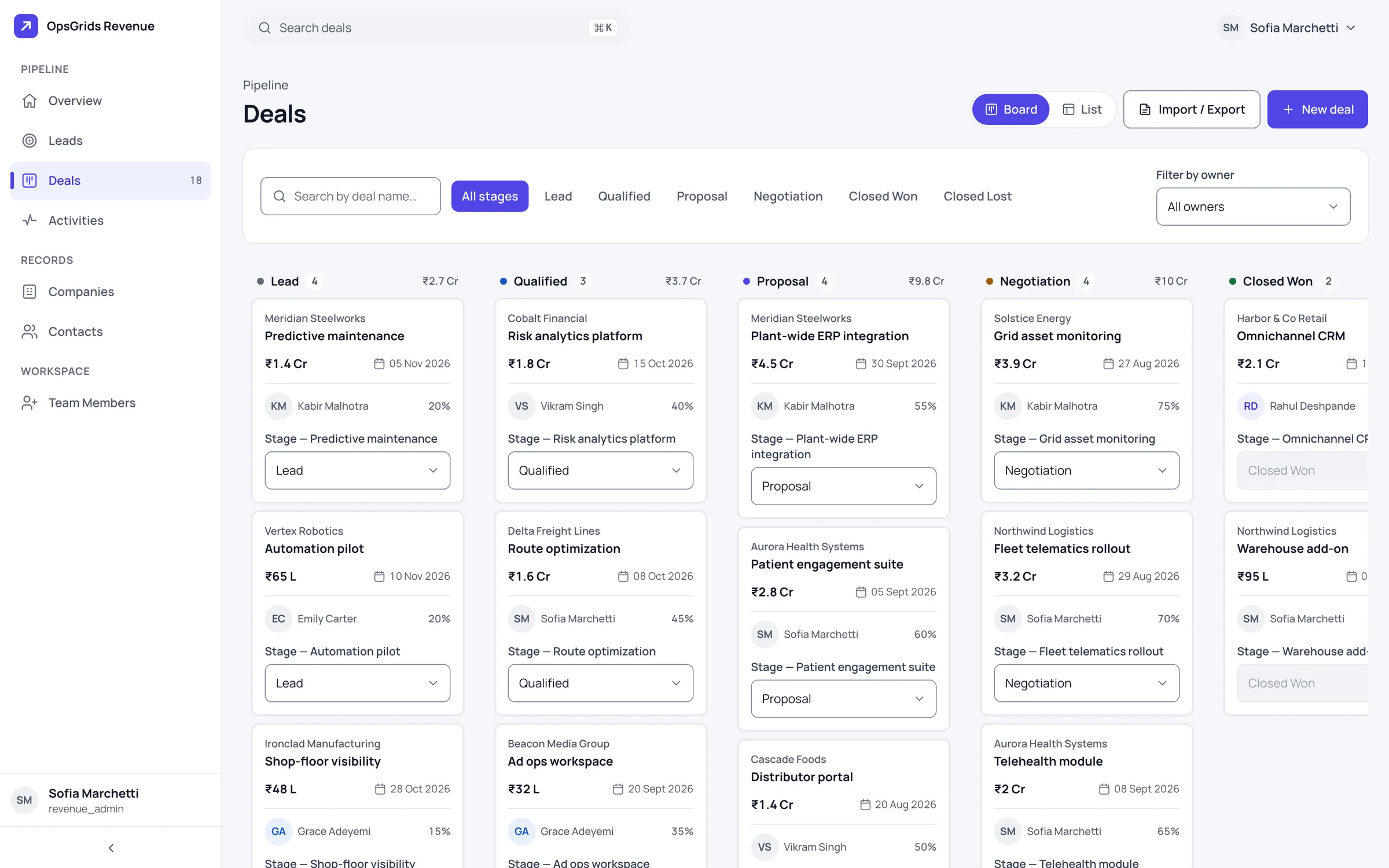
OpsGrids CRM is where a sale is worked from first enquiry to closed deal: the leads you are chasing, the companies and people behind them, the deals in progress and a log of what has happened with each. A customer's phone number stays protected even while your team uses it to reach them.
Who it is for
- A founder or sales head whose leads and customer list live across a spreadsheet, a phone and several WhatsApp chats.
- A business that wants each account to have a named owner, so nobody wonders who is looking after a customer.
- A team that handles customer phone numbers and wants every look at one to be recorded.
What you can do with it
Leads that convert in one step
Add a lead by hand or import a list from Excel, work it through new, working and qualified, then convert it. Conversion creates the company, the contact and the deal together, and the lead keeps a record of what it became. Only a qualified lead can be converted.
A deal pipeline, as a board or a list
Deals move through six stages: Lead, Qualified, Proposal, Negotiation, Closed Won and Closed Lost. See them as a board of columns or as a filterable list, and move a deal from the board or from its page. The overview shows the pipeline by stage and the deals that are overdue, closing soon or going quiet.
Companies and contacts with owners
Each company, contact, lead and deal has an owner, the person responsible for the relationship. The Team page is the directory of reps. It answers who is looking after an account and makes handovers clean. Companies, contacts, leads and deals can be imported from and exported to Excel.
An audited reveal
Phone numbers and lead emails are masked by default. A person with the permission can reveal one by entering a one-time code, and every reveal is logged: who looked at which value, and when.
Reaching a customer without decrypting the number
Messaging-target resolution lets a contact's sealed phone number be used as the destination for a WhatsApp or email message without anyone decrypting it. This join between CRM and Notification is live today; see how automations route messages.
An activity log
Log calls, emails, meetings and notes against your deals. The log keeps the history of an account in order and cannot be edited afterwards. A new owner reads it before the first call instead of asking around.
How it fits a working week
| When | What the team does |
|---|---|
| Start of week | Each owner reviews their leads and open deals |
| Before a call | Read the contact's activity log |
| When a number is needed | Reveal it with a one-time code, with the reveal logged |
| When a customer must be told something | Message them through the resolved target, number still sealed |
| End of week | Convert qualified leads, move deals along and check activities by owner |
Contact data that stays protected
In a spreadsheet, a phone number sits in plain sight, and anyone with the file can copy the whole list. In OpsGrids CRM the number is encrypted and masked until someone with the permission reveals it, and that reveal is written to a log. For everyday contact the reveal is often unnecessary: Notification resolves the sealed number as a messaging target, and the number never leaves the vault. The whole platform follows this rule for personal data; see privacy on the platform. If you are planning messages to customers, our guide to WhatsApp automation for Indian businesses covers opt-in and templates.
Where it stops today
There are no quotes: the quotation service is an empty scaffold, so keep quoting in your current tool. Pipeline stages are the same six for every organisation and cannot be edited yet. There are no dated follow-up tasks; activities record what already happened. Leads come from manual entry and Excel import, with no web-form capture. There is no combined customer screen. In an organisation without HRMS, permissions limited to a rep's own records do not work yet. See also one customer record across sales, support and finance.
Questions buyers ask
Can I run my sales pipeline in it? Yes, with the stages it has. Leads convert into a company, contact and deal, and deals move across six fixed stages on a board or list. Stages cannot be edited yet, and there are no quotes.
Can it capture leads from enquiries? You can add leads by hand or import them from Excel. Capture from a web form is not built.
Does it do quotations? Not yet. The quotation service is an empty scaffold.
Can anyone with access copy our customers' phone numbers? Numbers are masked by default, and each reveal needs the permission and a one-time code, and is logged.
Can we message a customer without revealing their number? Yes. CRM and Notification are joined so a sealed number can be messaged on WhatsApp or email without decrypting it.
Who can see an account? Access follows OpsGrids permissions, which carry a scope such as own, team, location or organisation. Own and organisation are enforced in the CRM today.